Test Local and stdio MCP Servers on Your Machine
MCP Playground Desktop is a desktop app for testing Model Context Protocol servers that run on your own computer: stdio servers started from a command, and HTTP or SSE servers on localhost. Connect, list and run tools, resources and prompts, read every JSON-RPC message, and let an AI model call your tools, without deploying anything.
Download MCP Playground Desktop
Version 0.1.0Mac builds are signed and notarized by Apple. Free 7-day trial with a free account, then included with paid plans. Not sure which Mac you have? Apple menu → About This Mac: “Chip: Apple M…” means Apple Silicon.
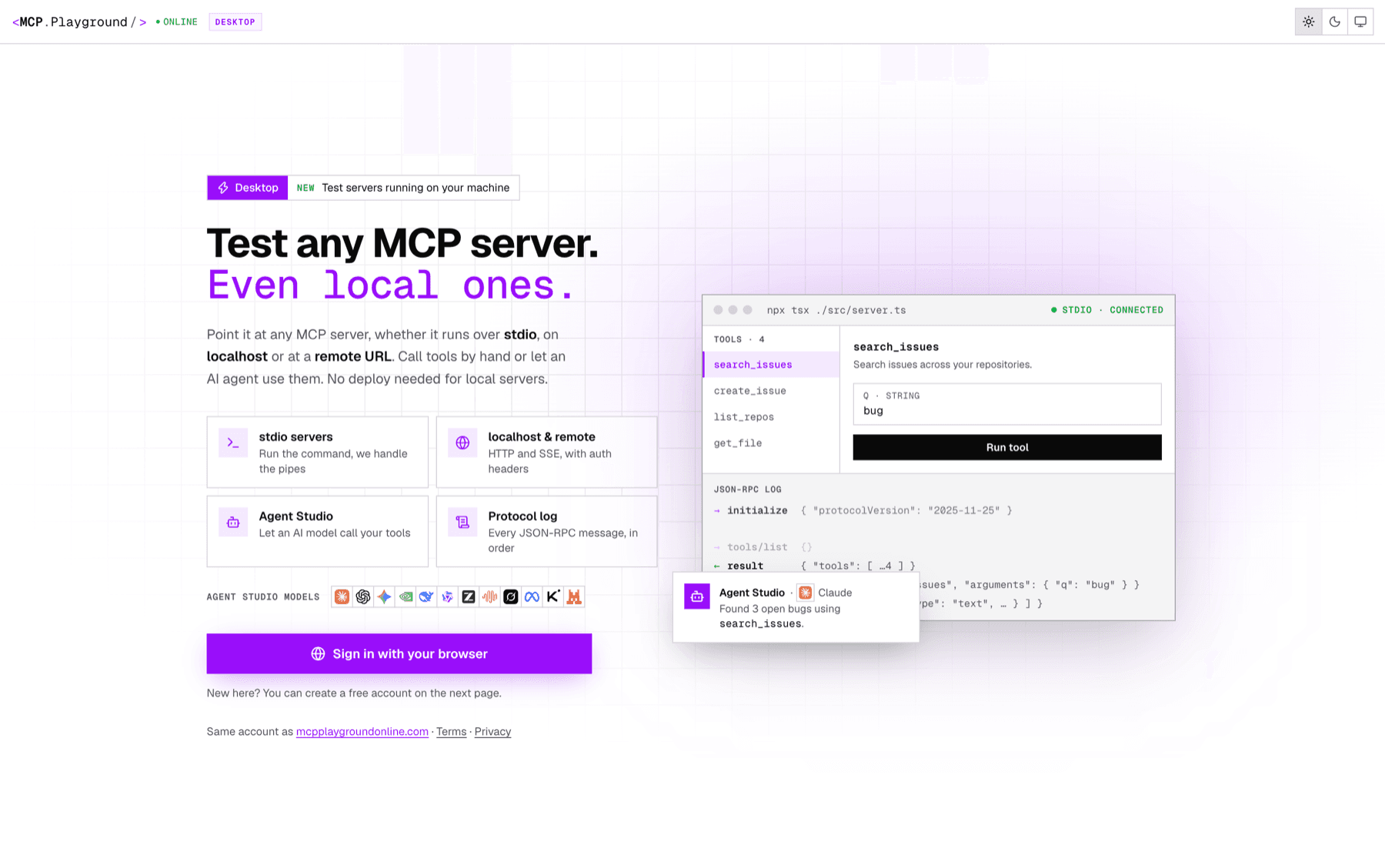
npx tsx ./src/server.ts: tools on the left, the tool form, and the JSON-RPC log below.Why local MCP servers need a desktop app
Most MCP servers start life on a laptop. Claude Desktop, Cursor and VS Code launch them over the stdio transport: the client runs a command such as npx, uvx or python server.py and exchanges JSON-RPC over the process’s stdin and stdout. There is no URL to paste.
A web page can’t do either half of that. It can’t start a program on your computer, and browsers block an HTTPS page from calling http://localhost. That’s why the browser-based MCP Server Tester only works with servers that have a public HTTPS URL. The desktop app runs on your machine, so it can do both.
How to test a stdio MCP server
- Install the app and sign in. Download MCP Playground Desktop for your Mac (Apple Silicon or Intel) or get it from the Microsoft Store on Windows. Open it and sign in with your browser, using a free MCP Playground account.
- Add your server. Choose stdio and enter the command that starts your server, for example npx tsx ./src/server.ts or uv run server.py, with any arguments, a working directory and environment variables. For an HTTP server, choose HTTP or SSE and enter its localhost URL and any headers. Or import the servers already configured in Claude Desktop, Cursor, VS Code, Windsurf or Claude Code.
- Connect. The app starts the process (or opens the connection), runs the initialize handshake and lists the server’s tools, resources and prompts. If the server fails to start or crashes, what it wrote to stderr appears in the log, so you see the reason instead of a silent failure.
- Run tools and read the protocol log. Pick a tool, fill in its arguments from a form generated from the tool’s JSON Schema, and run it. Every JSON-RPC request and response is listed in order in the log, so you can see exactly what your server sent back.
- Let an AI model use your tools. Open Agent Studio, pick one of 80+ models such as Claude, GPT or Gemini, and chat. You see which tools the model chooses, the arguments it sends and the results, before you wire the server into a real client.
Typical stdio commands:
# TypeScript, from source
npx tsx ./src/server.ts

# A published npm server
npx -y @modelcontextprotocol/server-filesystem ~/projects

# Python with uv
uv run server.py

# Built JavaScript
node build/index.js
Testing an MCP server on localhost
If your server speaks Streamable HTTP, start it yourself and connect to its local URL, usually http://localhost:3000/mcp (or /sse for the older HTTP+SSE transport). Add headers such as Authorization: Bearer … if your server checks them. Once it works locally and you deploy it, the same server can be tested from the browser with the online MCP Server Tester or checked with the MCP Security Scanner.
What the desktop app does
stdio servers
Runs your server command as a child process and speaks JSON-RPC over its stdin and stdout. Arguments, working directory and environment variables are set per server.
localhost and remote URLs
Streamable HTTP and the older HTTP+SSE transport, with custom headers for API keys and Bearer tokens. Works with http://localhost, which a browser page cannot reach.
Tools, resources and prompts
Browse everything the server exposes. Tool arguments get a form built from each input schema, and results are shown as formatted JSON.
JSON-RPC protocol log
Every message in both directions, in order, including the initialize handshake and error responses, plus anything the server writes to stderr.
Agent Studio
Chat with 80+ AI models that can call your server’s tools, to check tool descriptions and argument shapes against a real model.
Import your existing config
Reads the MCP servers already set up in Claude Desktop, Cursor, VS Code, Windsurf and Claude Code, or a pasted mcpServers JSON block.
Finds your tools
Loads the PATH from your login shell, so npx, uv, node and python resolve the way they do in your terminal. This is the usual cause of spawn npx ENOENT in desktop MCP clients.
History and saved connections
Recent tool calls are kept for re-running, and saved connections, sign-in and API keys are encrypted with your operating system’s keychain.
Desktop app, MCP Inspector or browser tester?
| MCP Playground Desktop | MCP Inspector (npx) | Browser tester | |
|---|---|---|---|
| stdio servers | Yes | Yes | No |
| localhost HTTP / SSE | Yes | Yes | No |
| Public HTTPS servers | Yes | Yes | Yes |
| Install | App (.dmg / Microsoft Store) | Node.js + npx each run | None |
| Saved connections and history | Yes | No | Yes, when signed in |
| Import Claude Desktop / Cursor / VS Code config | Yes | No | No |
| AI models calling your tools | 80+ models | No | 80+ models |
| Price | 7-day trial, then paid plans | Free, open source | Free |
Common local MCP server errors
spawn npx ENOENT(oruvx,node,python)- The client could not find the program. Apps opened from the Dock or Start menu get a shorter PATH than your terminal. MCP Playground Desktop loads your login shell’s PATH; elsewhere, use the full path from
which npx. - Parse error or “Unexpected token” right after connecting
- Something printed to stdout. In stdio, stdout is reserved for JSON-RPC; send logs to stderr.
- The server exits immediately
- Usually a missing environment variable (an API key) or the wrong working directory. Set both on the connection and read the server’s stderr in the log.
- Connection refused on localhost
- The HTTP server isn’t running, or listens on a different port or path. Check the exact URL, including
/mcpor/sse.
More fixes in common MCP server errors and how to fix them.
System requirements
- macOS: macOS 13 Ventura or later, Apple Silicon or Intel. Signed with a Developer ID and notarized by Apple.
- Windows: Windows 10 or 11, 64-bit, from the Microsoft Store.
- Account: a free MCP Playground account. The same account and credits work on the website and in the app.
- Your server’s runtime: whatever your server needs to run (Node.js, Python, uv, Docker), installed as usual.
Frequently asked questions
How do I test a local MCP server?
How do I test an MCP server that uses the stdio transport?
Why can’t a browser-based MCP tester connect to my local server?
Is MCP Playground Desktop an alternative to the MCP Inspector?
How do I fix “spawn npx ENOENT” when starting an MCP server?
Why does my stdio MCP server fail with a parse error?
Which operating systems are supported?
Is MCP Playground Desktop free?
Does the app send my local server’s data anywhere?
Can I test servers I already use in Claude Desktop or Cursor?
Related
- MCP Server Tester — test a deployed server from the browser, no install
- MCP Inspector Online — inspect a remote server’s schemas without
npx - Mock MCP Servers — public servers for testing your MCP client
- How to test an MCP server, step by step
Download MCP Playground Desktop
Version 0.1.0Mac builds are signed and notarized by Apple. Free 7-day trial with a free account, then included with paid plans. Not sure which Mac you have? Apple menu → About This Mac: “Chip: Apple M…” means Apple Silicon.