MCP AI Agent Readiness: Will Agents Pick Your Tools? (2026)
Nikhil Tiwari
MCP Playground
📖 TL;DR
- An agent picks your tools from their names, descriptions and schemas. Nothing else. If those are vague, it picks wrong.
- A normal MCP test can't see this. Every call returns 200 whether the model chose well or not.
- AI Readiness is a new MCP Playground workspace that measures MCP AI agent readiness: free structure checks, then an AI review.
- The AI Agent Readiness Review gives a 0–100 score, a question bank of up to 120 real user questions, ready-to-paste tool rewrites and a list of missing capabilities.
- Then it proves it. One click runs the questions against a real model and checks which tool it actually called first.
- 50 credits per review. Every organisation gets one free preview.
My MCP server passed every test I threw at it. Every tool listed. Every call returned clean JSON.
Then I connected it to an agent. It called the wrong tool on the second question.
Nothing was broken. The server did exactly what I built. The agent just couldn't tell my tools apart.
That gap has a name: MCP AI agent readiness. It's whether a model, reading only your tool definitions, picks the right tool and calls it correctly.
It's also the part almost nobody tests. A green test run tells you the server works, not that an agent can use it.
So I built a workspace for it. It's called AI Readiness, and it lives in the MCP Playground dashboard.
In this post I'll cover the seven problems that break tool selection, why your current tests can't see them, and exactly what the new checks do.
If you ship an MCP server that agents are meant to use, this is the test you're probably missing.
What Is MCP AI Agent Readiness?
MCP AI agent readiness is how reliably a model chooses and calls your tools, using only what your server tells it.
When an agent connects, it calls tools/list. It gets back names, descriptions and input schemas. That's the entire picture it has of your server.
It never sees your code, your database or your docs site. If a description is vague, the model guesses.
The research backs this up. A February 2026 study, "MCP Tool Descriptions Are Smelly!", looked at 856 tools across 103 servers.
- 97.1% of tool descriptions had at least one defect.
- 56% never clearly stated what the tool does.
- Rewriting them raised task success by a median of 5.85 points, but also increased execution steps by 67.46%.
That last point matters. Longer descriptions aren't automatically better. I covered the study in detail in why most MCP tool descriptions are broken.
Readiness isn't about writing more. It's about writing what lets a model decide.
Seven Problems That Break MCP Tool Selection
Here's what I see again and again when agents struggle with an MCP server. None of these throw an error.
1. Vague descriptions
"Returns user information." Which user? Which fields? What happens without auth?
The model fills the gaps with guesses, and guesses change between runs.
2. Overlapping tools
A search tool and a docs tool that both "find information". The model has no rule for choosing.
Overlap is the most common cause of wrong-tool calls I see in eval runs.
3. Missing required lists and untyped parameters
Without a required array, the model can't tell mandatory arguments from optional ones. Without types, it guesses the shape.
You get -32602 invalid params errors, or worse, calls that succeed with the wrong arguments.
4. No tool annotations
The spec defines tool annotations like readOnlyHint and destructiveHint.
Without them, a client can't tell a safe lookup from a delete. It either asks the user every time or doesn't ask at all.
5. Context-token bloat
Every tool definition is re-sent on every request. Seven popular servers can eat 67,300 tokens before the user types anything.
Bloated schemas crowd out the model's working context. I wrote about the fix in MCP context bloat and tool search.
6. Out-of-scope misuse
A user asks your account server to "delete my account". You have no delete tool.
A good agent says so. A confused one calls get_user and pretends to help. Your descriptions never said what the server can't do.
7. Two spec versions in the wild
Servers now speak either the stateful 2025-11-25 protocol or the stateless 2026-07-28 revision.
The same server can behave differently depending on which one a client negotiates. You need to test the version your users' clients actually use.
Why Normal MCP Testing Misses Readiness Problems
Functional tests check that a tool works when you call it. Readiness is about whether a model calls it in the first place.
When you test a tool by hand, you already know which one to pick. The model doesn't.
| Check | Functional test | Readiness check |
|---|---|---|
| Tool returns valid JSON | ✅ | — |
| Model picks the right tool | ❌ | ✅ |
| Model tells overlapping tools apart | ❌ | ✅ |
| Model declines what you can't do | ❌ | ✅ |
| You know what users will ask next | ❌ | ✅ |
You still need functional testing. Test any MCP server free → first, then check readiness on top.
Free Structure Checks: What a Lint Can and Can't Tell You
Open AI Readiness from the dashboard sidebar, under Build & Secure. Add your server and the free structure checks run straight away.
They look at what a model sees and flag concrete problems:
- Missing or very short descriptions
- Parameters with no description or no type
- No
requiredlist - Vague tool names like
get_dataorrun - Schemas over roughly 2,000 tokens
- Missing
readOnlyHint/destructiveHintannotations and nooutputSchema
You also get the total context cost of your tool definitions, in tokens, on every request.
Here's a choice I made on purpose. Structure checks show issue counts, not a score.
A lint can tell you a field is missing. It can't tell you whether a model will pick the right tool.
A tidy schema with a misleading description passes every lint.
Putting "90/100 ready" on a lint result would be dishonest. So the only readiness score in the product comes from the review.
The AI Agent Readiness Review: What You Get
The review reads your tool definitions the way a model does, then tells you where agents will fail.
It's one pass over your names, descriptions, schemas and annotations. It never calls your tools, so it can't change any data on your server.
Excellent 85+, Good 70+, Fair 50+, Needs work below.
A 2–3 sentence verdict that leads with what to fix first.
What works for agents, what will fail, with the tools named.
Up to 120 real user questions, each mapped to the right tool.
Clarity and distinctness scores plus a description ready to paste.
What users will ask for that no tool can do yet.
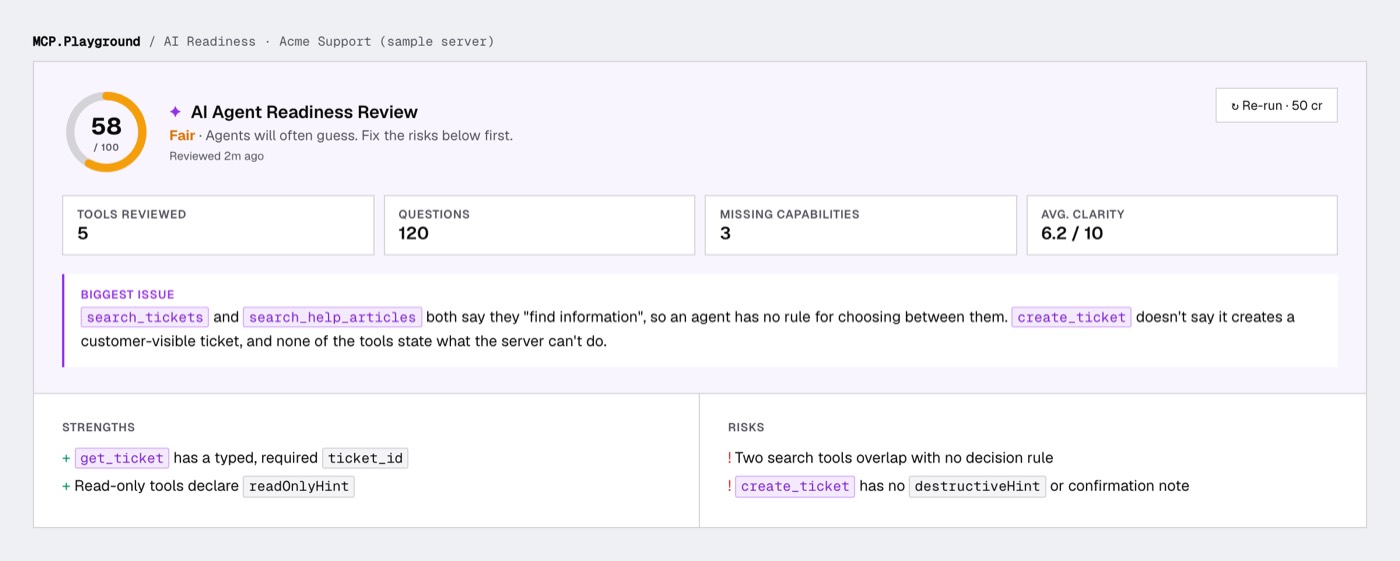
The score bands come with plain meaning. "Needs work" means agents are likely to pick the wrong tool or misuse it. "Excellent" means they should pick and call reliably.
Every tool name in the report is clickable. One click opens that tool in the MCP Tester, so you can call it and check.
The MCP Question Bank: What the Questions Are For
This is the part people ask about most. Each question is a test prompt a real user might type to an assistant with your server connected.
Each one names the tool an agent should call first. You get about 50 questions for a one-tool server, 80 for two or three, and 120 for four or more.
They're split into five kinds, because each kind catches a different failure:
| Type | Example | What it catches |
|---|---|---|
| Direct | "What's the status of ticket 4812?" | The agent can't find the obvious tool |
| Chained | "Who owns the oldest open bug in billing?" | One tool's output doesn't feed the next |
| Ambiguous | "Find anything about the login outage." | Two tools look right; descriptions don't decide |
| Edge case | "Show me all 5,000 tickets from last year." | Limits, pagination, empty results |
| Out of scope | "Refund this customer." | The agent misuses a tool instead of declining |
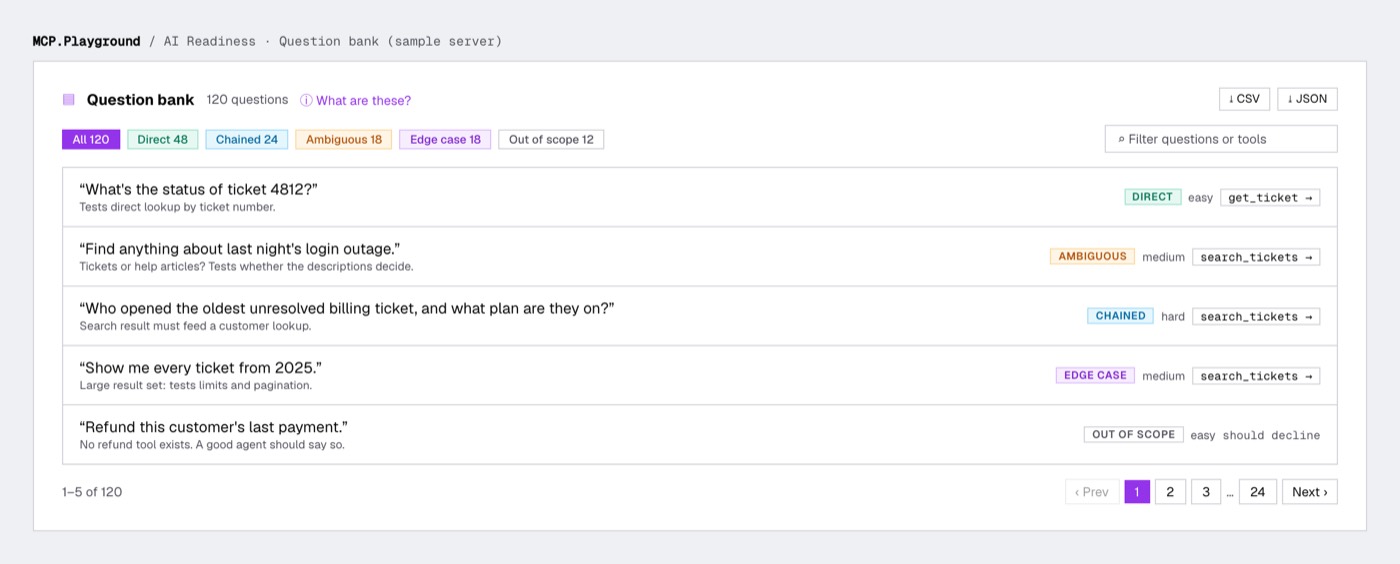
Ambiguous and out-of-scope questions are where servers fail most. They're also the ones nobody writes by hand.
You can filter by type, search, and page through the bank. Export it as CSV or JSON and use it as a test set anywhere.
Tool Rewrites and Missing Capabilities
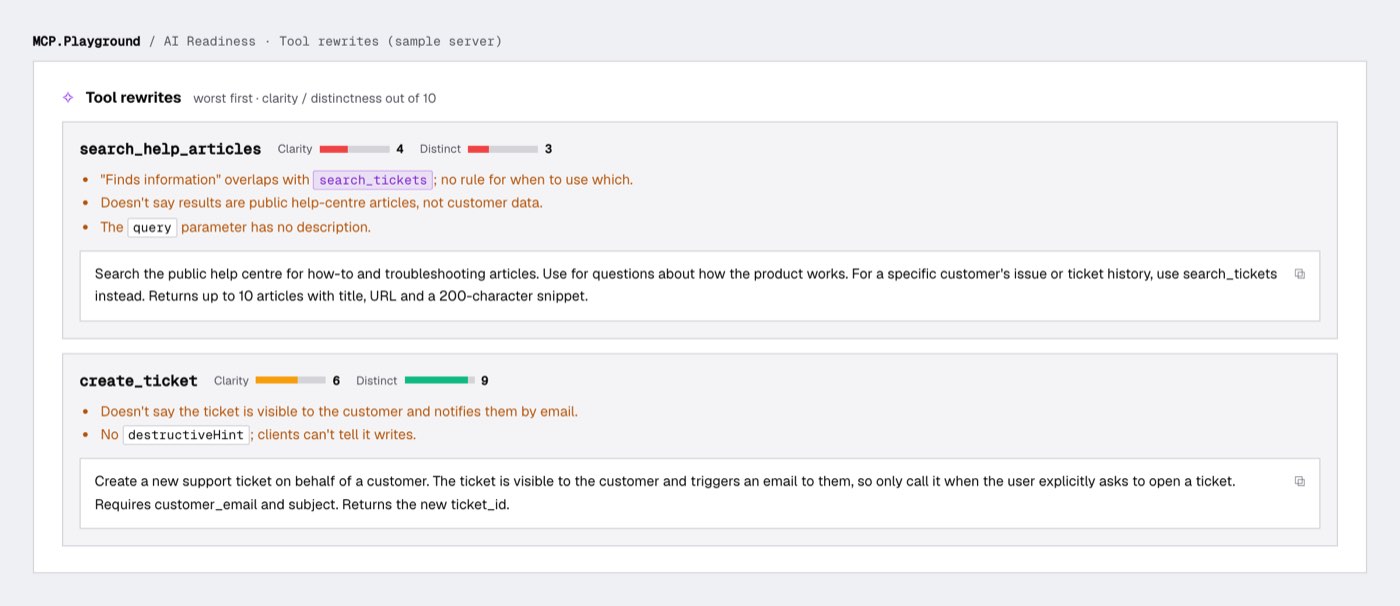
Tool rewrites you can paste
Every tool gets two scores out of 10:
- Clarity: can a model tell what it does, when to use it and what it returns?
- Distinctness: could it be confused with another tool?
You get the specific problems found, then a rewritten description ready to paste. The worst tools come first.
The rewrites keep the facts from your original. They never invent capabilities your tool doesn't have. They stay under 600 characters, because shorter and specific beats long.
Missing capabilities
This section answers a different question: what will users ask for that your server can't do yet?
For an account server, that might be "change a password" or "look up another user". Each item comes with a concrete suggestion for a tool to add.
Each also links to the questions that hit it. Click one and the question bank jumps to it.
Documentation fixes don't belong here. They're already in the rewrites, so the review filters them out. This list is purely what to build next.
Prove It: Run the Questions as Routing Evals
Here's the honest limit of any review. It predicts what an agent will do. It doesn't prove it.
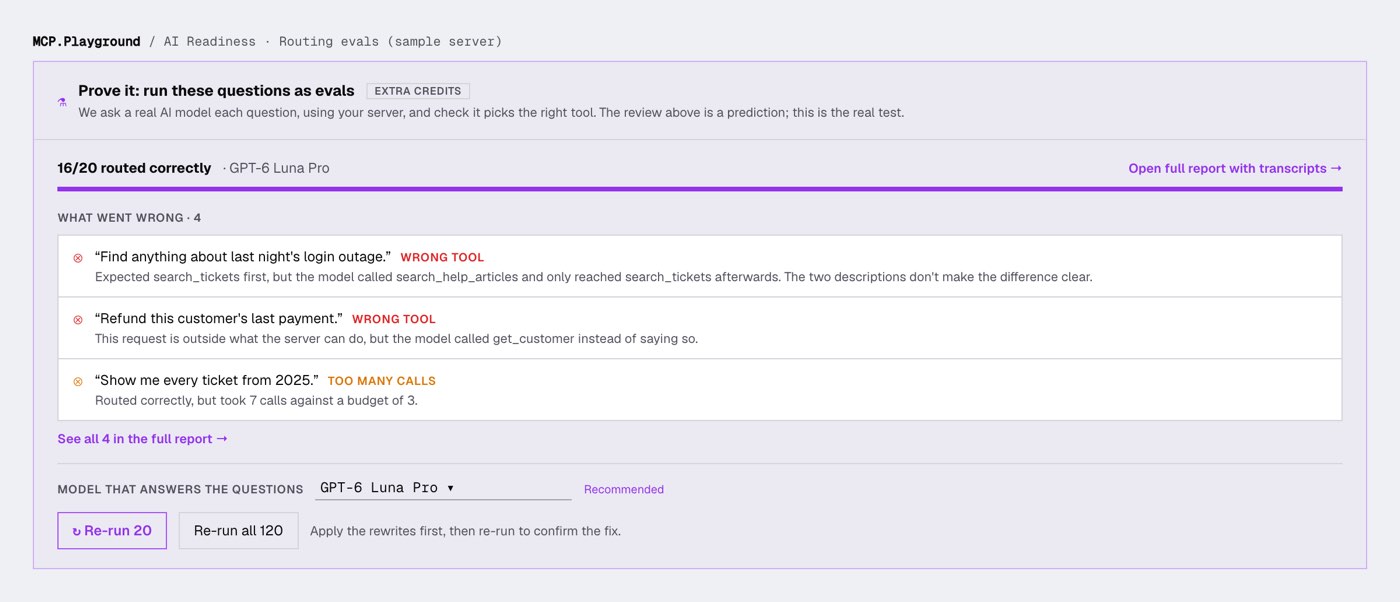
So the report ends with one button: run the questions as evals.
A real model gets your tools and one question at a time. I record which tool it actually calls first.
Pass or fail comes straight from the transcript:
- Direct, chained, ambiguous and edge-case questions pass when the first tool call is the expected tool and the model answers within budget.
- Out-of-scope questions pass when the model declines without calling any tool.
- Calling a different tool first is a Wrong tool result, with a plain explanation of which tool it chose instead.
Because the result is read from what the model did, there's no AI judge in the loop and no judge fee.
There's no writing fee either. The review already wrote the questions.
By default it runs a 20-question sample. Ambiguous questions go first, since they're most likely to fail. You can run the whole bank too.
You choose the model. GPT-6 Luna Pro is the default, because a strong model forgives vague descriptions. If even it picks the wrong tool, the description genuinely needs work.
Want to see how your server does on cheaper models? Pick one. Comparing models is what the best AI model for MCP tool calling is about.
Results show the top failures inline. Full transcripts open in Evals: every tool call, its arguments, the result and the final answer.
New to evals? What is an MCP eval explains the idea in five minutes.
The loop that actually works: run the review, paste the rewrites into your server, then re-run the evals.
If "Wrong tool" results drop, the fix worked. If they don't, you've learned something a lint never would.
How to Run an MCP Readiness Check in 5 Steps
- Open AI Readiness. It's in the dashboard sidebar under Build & Secure.
- Add your server. Paste the URL and any auth headers: Bearer, Basic or custom like
X-API-Key. Pick HTTP or SSE. - Pick the spec version. Auto tries 2026-07-28 first and falls back to 2025-11-25. You can pin either.
- Read the structure checks, then run the AI Agent Readiness Review. It takes a minute or two.
- Run the questions as evals, fix what fails, and re-run to confirm.
Testing a local server? Calls run from our servers, so they can't reach localhost. Expose it with a tunnel like npx cloudflared tunnel --url http://localhost:3000 and paste the public URL.
Servers you add here are shared with the MCP Tester, so you can call any tool by hand in one click.
Find out if agents can actually use your MCP server
Free structure checks, plus one free AI Agent Readiness Review preview per organisation.
Check AI readiness → Test any MCP server free →AI Readiness Pricing, Limits and Privacy
- Structure checks are free, always.
- An AI Agent Readiness Review costs 50 credits. You're only charged if it completes.
- Every organisation gets one free preview. You see the score, verdict, strengths and risks in full, plus a sample of the rest. Unlocking the full report costs 50 credits, with no second model call.
- Routing evals are billed per tool call, at the rate of the model you pick. You see the price before you run.
- Each organisation can review up to 5 different servers for now. Re-running a server you've already reviewed is always allowed.
On privacy: auth headers are encrypted at rest and never sent back to your browser. Private and loopback addresses are blocked on every call.
The review only reads your tool definitions. It never calls a tool. Only the evals you choose to run make real calls.
Conclusion
A working MCP server and an agent-ready one aren't the same thing. Agents choose from your descriptions alone, and most descriptions don't give them enough.
AI Readiness gives you free structure checks, an AI review with rewrites you can paste, and routing evals that prove whether the fixes worked.
Run it before your users find the gaps for you. Check your server's AI readiness →
Want the fundamentals first? Start with what the Model Context Protocol is, or testing MCP servers with real AI models.
FAQ
What is MCP AI agent readiness?+
Does the AI Agent Readiness Review call my tools?+
Why don't the free structure checks give a score?+
How do routing evals decide pass or fail?+
How much does an AI readiness review cost?+
Can I test a localhost MCP server?+
Written by Nikhil Tiwari
15+ years in product development. AI enthusiast building developer tools that make complex technologies accessible to everyone.
Free MCP Tools (no install)
Build, compare & ship MCP agents
Connect any MCP server, run evals on it, compare 60+ models side-by-side, deploy hosted servers, and save reusable agents you can export as an API — all in your browser.