MCP Agent Studio

Connect Any MCP Server.

Sign in with email

Free credits on sign-up · No credit card · Terms

Or browse agent templates · hosted MCPs — no sign-in needed.

Discover the best, most cost-effective model for your AI agent use case

ClaudeClaude
OpenAIOpenAI
GeminiGemini
DeepSeekDeepSeek
MistralMistral
GrokGrok
QwenQwen
NVIDIANVIDIA
MiniMaxMiniMax
KimiKimi
+5
more

What you can do

One workspace, four ways to ship with MCP

Chat

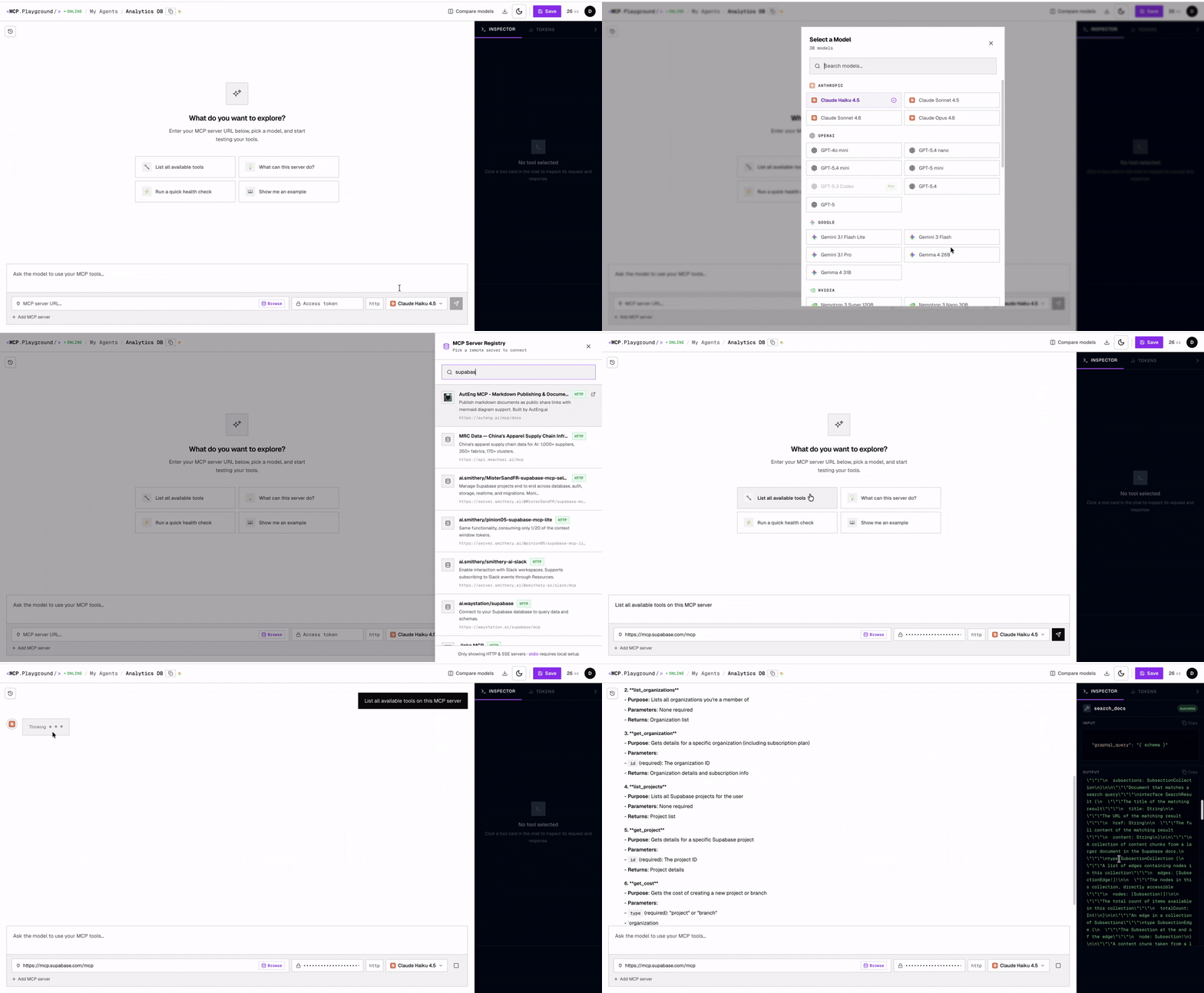
Chat with your MCP server in plain English

Connect any MCP server — remote HTTP, SSE, or Streamable HTTP — pick a model, and start asking questions. The agent discovers your tools, decides which to call, and streams every invocation live with full JSON input and output. No glue code, no SDK install.

  • Up to 4 MCP servers per chat — tools merged automatically
  • Live tool-call trace with per-call latency and full JSON
  • Switch model mid-chat to compare reasoning quality
Open Agent Studio
Chat with your MCP server: model picker, server connector, and live tool calls streaming as the AI agent answers.
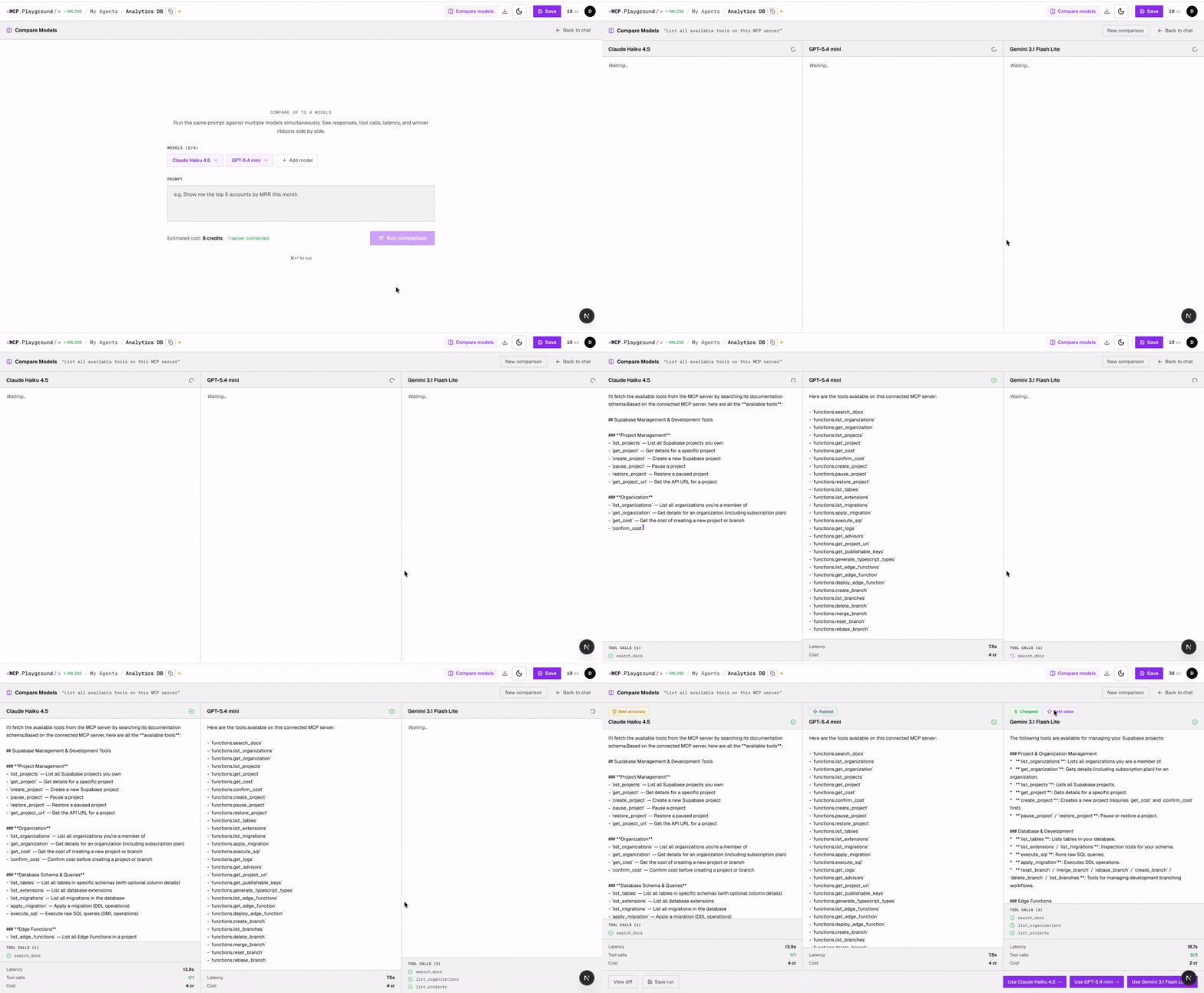
Compare Mode: same MCP prompt running across multiple AI models in parallel with live tool calls and winner ribbons.
Test MCP with AI

Test your MCP server across 30+ AI models — in one run

Send the same prompt to up to 4 models in parallel: Claude, GPT-5, Gemini, DeepSeek, Grok and more. See every tool call live, compare outputs side-by-side, and let automatic winner ribbons surface the fastest, cheapest, and most accurate model for your tools.

  • Up to 4 models per run — Claude, GPT, Gemini, DeepSeek, Grok, Qwen…
  • Auto-computed winners: Fastest, Cheapest, Best Accuracy
  • See exactly which tools each model called and why
Try Compare Mode
Save & Reuse AI Agents

Configure once, reopen forever

Pin a model, MCP servers, and a system prompt as a named agent — “GitHub Code Reviewer”, “Stripe Refund Assistant”, “Linear Standup”. Reopen any saved agent in one click from your sidebar, or start from one of dozens of pre-built templates and customize from there.

  • Pre-built templates for GitHub, Stripe, Linear, Slack, Notion + more
  • One-click reopen — model, servers and prompt restored exactly
  • Per-agent system prompts you can iterate on
Browse agent templates
Save as Agent
GitHub Code Reviewer
Claude Sonnet 4.6
🐙 GitHub📋 Linear
You are a thorough code reviewer. For each PR, summarise risk, flag missing tests, and link related Linear issues…
Saved · reopen anytime

My agents

🐙 GitHub Code Reviewer💳 Stripe Refund Assistant📋 Linear Standup📊 Analytics Q&A
Terminal · curlHobby API

POST endpoint

https://mcpplaygroundonline.com/api/v1/agents/<AGENT_ID>/chat
$ curl https://mcpplaygroundonline.com/api/v1/agents/agt_8f3d/chat \
   -H "Authorization: Bearer mcpp_••••••••••" \
   -H "Content-Type: application/json" \
   -d '{ "message": "Top 5 open PRs?" }'

# → streamed response with tool calls + final answer
{ "role": "assistant",
  "text": "Found 5 open PRs. Top: #312 Auth timeout (P0)…",
  "tool_calls": [{ "name": "list_pull_requests" }]
}
Export AI Agent with MCPs

Export your agent as a callable API

Every saved agent gets a stable endpoint. Generate an API key in settings, then call /api/v1/agents/<id>/chat from your backend, scripts, or worker. Same model, same MCP servers, same system prompt — now driven by your code.

  • Bearer-token auth with per-org keys you can rotate anytime
  • Locked-in system prompt — your guardrails are server-side and can’t be overridden through API input
  • Pre-configured safety: pagination caps, tool-failure handling, and per-server tool isolation on every call
  • Reuses the agent you tested in Studio — no drift between dev and prod
  • Streamed responses with tool-call traces in the payload
Get an API key

Who is this for?

Pick your starting point

Add one or more MCP servers, pick any AI model, and ask in plain English. Inspect every live tool call, compare models side-by-side, and find the best quality-to-cost fit for your workflow.

Test & Compare with AI

For MCP developers

Connect your server and run it against Claude, GPT, Gemini & 30+ models side-by-side. See every tool call live before you ship.

Build a Reusable Agent

For teams & power users

Start from a Stripe, GitHub, or Linear template. Pick your model, save the config, and use it every day — no re-setup.

Sign in with email

Free credits on sign-up · No credit card · Terms

Or browse agent templates — no sign-in needed.

Templates

Start from a pre-built agent

Ready-to-run templates for the tools you already use — click one, add your access token, and start chatting in under a minute. No sign-in needed to browse.

Knowledge base

Notion Knowledge Agent

Chat with your Notion workspace — search pages, summarise docs, create new entries and keep your knowledge base tidy.

Single serverView →
Most popular

GitHub Code Review

Review PRs, inspect diffs, summarise commits and suggest improvements across any repository.

Single serverView →
Error monitoring

Sentry Error Triage

Triage Sentry errors in natural language — inspect stack traces, group issues and spot the commits that caused them.

Single serverView →
Productivity

Linear Project Manager

Create issues, triage backlogs, track progress and summarise sprint status directly from chat.

Single serverView →
CRM

HubSpot CRM Assistant

Query contacts, deals and companies in HubSpot — update records, spot pipeline risks and draft personalised outreach.

Single serverView →
E-commerce

Shopify Store Ops

Query orders, products and customers on your Shopify store — track inventory, surface top SKUs and draft replies to buyers.

Single serverView →
E-commerce

Amazon Ads Operator

Query Sponsored Products, Brands and Display campaigns in plain English — bid adjustments, keyword analysis and performance reports without Seller Central tab-switching.

Single serverView →
3 servers

Paid Media ROAS · Meta, Amazon & Stripe

Meta Ads, Amazon Ads and Stripe in one chat — see true blended ROAS across Facebook, Instagram and Amazon with live revenue attribution.

3 serversView →
Automation

Zapier Automator

Trigger automations, list Zaps and manage workflows across 6,000+ connected apps.

Single serverView →
3 servers

Full-Stack Shipper · GitHub, Vercel & Sentry

GitHub PRs, Vercel deploys and Sentry errors in one chat — the complete Next.js ship-and-debug loop.

3 serversView →

30+

AI Models

Pre-built

Agent Templates

4

MCP Servers per Chat

Free

To Get Started

FAQ

Frequently asked questions

Everything you might want to know about using AI agents with MCP servers.

What is MCP Agent Studio?

MCP Agent Studio is a browser-based AI agent that connects to any Model Context Protocol (MCP) server and lets you query your data in plain English using 30+ AI models including Claude, GPT-5, Gemini, DeepSeek, Mistral, Grok, Qwen, NVIDIA Nemotron, and more. Sign up for free — no credit card required.

Do I need to write code to use MCP Agent Studio?

No. MCP Agent Studio is a no-code interface. You paste your MCP server URL, pick an AI model, and start chatting. The agent discovers the available tools automatically and calls them for you as needed.

Which AI models can I use with MCP Agent Studio?

You can use 30+ models from every major provider, including Claude Opus 4.6, Claude Sonnet 4.6, GPT-5.4, GPT-4o, Gemini 3.1 Pro, DeepSeek V4, Mistral Small 2603, Grok 4, Qwen 3, NVIDIA Nemotron Super 120B, Google Gemma 4, Z.AI GLM 4.5 Air, and more. You can switch models mid-conversation to compare responses on the same task.

What is an MCP server and do I need one?

An MCP server is a lightweight service that exposes tools (functions, database queries, API calls) over the Model Context Protocol so any AI agent can use them. Popular public MCP servers include GitHub, Supabase, Notion, Slack, Stripe, Postgres, Linear, and Playwright. You can also connect your own custom MCP server over HTTP, SSE, or Streamable HTTP.

How does pricing work?

MCP Agent Studio is free to sign up — no credit card required. Running AI models costs credits, which you can purchase in packs from your Settings page. New accounts may receive a small starter credit to try the product. Credit costs vary by model; check the Settings › Credits page for current pricing.

Can I query my own database with MCP Agent Studio?

Yes. Connect the official Postgres or Supabase MCP server (or any MCP server that wraps your database) and ask questions in plain English: "Show me my top 10 customers by revenue this month." The AI generates the SQL, runs it through the MCP server, and returns the results with a natural-language summary.

How is this different from ChatGPT or Claude Desktop?

Claude Desktop only works with Claude. ChatGPT only works with OpenAI models. MCP Agent Studio works with any model from any provider — swap between Claude, GPT, Gemini, DeepSeek, and Grok on the same MCP server without re-configuring anything. It also runs entirely in your browser with no local installation.

Is my data secure?

Your MCP server credentials stay in your browser session and are never stored on our servers. Conversations are scoped to your Supabase-authenticated organization. We never train on your data, and you can delete your history at any time from Settings.

Can I compare multiple AI models on the same task?

Yes — this is one of the core reasons people use MCP Agent Studio. Run the same prompt against Claude, GPT-5, and Gemini side by side, inspect every tool call in the live trace panel, and find the cheapest model that still gives great results. Teams routinely cut inference costs 5–10× this way.

What MCP servers work with Agent Studio?

Any MCP server that speaks HTTP, SSE, or Streamable HTTP. That includes official servers for GitHub, Supabase, Postgres, Notion, Slack, Stripe, Linear, Playwright, Filesystem, Memory, Sequential Thinking, and hundreds of community servers. You can also point it at your own custom server deployed on Cloudflare Workers, Vercel, Fly, or anywhere else.

Do you have pre-built templates I can use?

Yes. MCP Agent Studio ships with ready-to-run templates covering Notion, GitHub, Amazon Ads, Jira, Confluence, Sentry, HubSpot, Stripe, Linear, Slack, Supabase, Vercel, Shopify, Cloudflare, Zapier, and more — including multi-server combos like GitHub + Vercel + Sentry and Amazon Ads + Stripe for blended ROAS. Pick a template, add your access token, and start chatting in seconds. Browse all templates at /templates.

Can I save an agent configuration and reuse it?

Yes. Once you set up a model, one or more MCP servers, and a system prompt, you can save the whole configuration as a named agent with one click. Open it again any time from "My Agents" — your servers, tools and model selection are all restored. Agents can be private or shared with your team.

Can I compare multiple AI models on the same MCP task?

Yes. Compare Models runs the same prompt across 2–4 models in parallel and shows you a side-by-side grid: tool-call accuracy, latency, token usage and final output. This is the fastest way to find the cheapest model that still gives great results on your specific MCP server — teams regularly cut inference costs 5–10× this way.

Can I export my agent as code?

Export is coming soon. Save your agent and open Export in the studio toolbar to preview a Next.js App Router layout or a Python starter (MCP wiring, prompts, .env.example, deploy targets). Downloadable ZIP packs and one-click deploy will ship in a follow-up release; until then you can explore the preview and recreate wiring manually if you self-host.

Get started in seconds

Start chatting with your data — free

No credit card required. Connect any MCP server and start querying it with Claude, GPT-5, or Gemini in under a minute.

Sign in with email

Free credits on sign-up · No credit card · Terms

MCP Agent Studio — Multi-Model MCP Client · Start for Free | MCP Playground