MCP Inspector Alternatives: Inspector vs Postman vs Desktop App (2026)
Nikhil Tiwari
MCP Playground
📖 TL;DR
- All three test stdio and HTTP MCP servers, list tools, resources and prompts, and show you the raw messages.
- MCP Inspector is the free, open-source reference. Pick it for OAuth debugging, MCP Apps, and a CLI you can run in CI.
- Postman fits if your team already lives there: MCP requests sit in shared collections next to your REST and GraphQL requests.
- MCP Playground Desktop is for local servers that won't behave: one-click import from five clients, a stderr tab, plain-English spawn errors, and 80+ models calling your tools.
- Server already on a public HTTPS URL? You don't need to install anything. The browser tester is free.
Table of Contents
- Why look for an MCP Inspector alternative?
- MCP Inspector vs Postman vs MCP Playground Desktop
- MCP Inspector v2: what it does well
- Postman as an MCP client
- MCP Playground Desktop
- Which one handles a broken local server best?
- Testing with AI models
- Which MCP testing tool should you pick?
- FAQ
Why look for an MCP Inspector alternative?
The MCP Inspector is the first tool most people use to test an MCP server. It's official, free and does the core job.
People still go looking for an MCP Inspector alternative, for three reasons I hear again and again:
- "It works in the Inspector, but not in Claude Desktop." You launch the Inspector from your terminal, so your server inherits that terminal's PATH and working folder. That hides the bugs a real client hits.
- "I want my requests saved and shared." Teams that test APIs in Postman want MCP in the same place.
- "The tools work by hand. Will a model actually pick them?" The Inspector calls tools for you. It doesn't put a model in the loop.
I build MCP Playground, so I'm not neutral. I've tried to be fair anyway: the Inspector and Postman each win some rows below. Everything here was checked against their docs as of October 2026.
MCP Inspector vs Postman vs MCP Playground Desktop
| MCP Inspector v2 | Postman | MCP Playground Desktop | |
|---|---|---|---|
| Install | npx, Node 22.19+ | Postman app + account | .dmg or Microsoft Store |
| Transports | stdio, Streamable HTTP, SSE | stdio, HTTP (legacy option) | stdio, Streamable HTTP, SSE |
| 2026-07-28 stateless spec | Yes (protocolEra) | Yes, auto-detected on HTTP | Yes (Auto / pin either) |
| Saved servers | Catalog file | Collections | Saved connections |
| Bring in client configs | Point --config at an mcpServers file | Paste one server's JSON | Reads 5 clients' files, or paste |
| OAuth sign-in flow | Yes, very thorough | Yes, plus an OAuth Debugger | No: bearer token and headers |
| Server stderr in its own view | — | — | Yes |
| CLI for CI | Yes (--cli, JSON output) | — | Not yet |
| MCP Apps (UI resources) | Yes, sandboxed | — | No |
| AI models calling your tools | No | Yes, via AI requests | 80+ models, with approvals |
| Price | Free, open source | Postman account and plan | 7-day trial, then paid plans |
A dash means I couldn't find it in the tool's docs. It doesn't prove the feature is missing.
MCP Inspector v2: what it does well
If you last used the Inspector in 2025, it has changed a lot. Version 2 is a rewrite, released under the same command:
npx @modelcontextprotocol/inspector          # web UI on localhost:6274
npx @modelcontextprotocol/inspector --cli    # scriptable CLI
npx @modelcontextprotocol/inspector --tui    # terminal UI
What's new, from the v1 to v2 migration guide:
- No more separate proxy. v1 ran a UI on port 6274 and a proxy on 6277. v2 runs one web server on 6274.
- Saved servers live in a catalog file,
~/.mcp-inspector/mcp.json, shared by the web UI, CLI and TUI. v1 kept them in browser storage. - OAuth in the CLI too, with flags like
--stored-auth-onlythat never open a browser. That's built for CI. - Clear exit codes. A tool call that returns
isError: trueexits with code 5, so a CI step can fail on it. - A per-server
protocolEraoflegacy,autoormodern. The default islegacy.
It also renders MCP Apps in a sandboxed frame, which the other two don't. If you're building interactive UI into your tools, this is your tool.
Where the Inspector falls short
- It needs Node 22.19 or newer. npm only warns on older versions, so check
node --versionfirst. - It runs from your terminal, so your server gets your shell's PATH and folder. "Works in the Inspector" can still mean "fails in Claude Desktop".
- No model in the loop. You call each tool yourself, so a vague tool description won't show up as a problem.
- Secrets fall back to a plain file. Without an OS keychain, tokens and env values go to
~/.mcp-inspector/secrets.json, unencrypted unless you set a key.
Postman as an MCP client
Postman supports MCP requests next to HTTP, GraphQL and gRPC. You click Add → MCP in the sidebar and pick STDIO or HTTP.
From there, the flow is familiar if you know Postman:
- Enter a command or URL, or paste a server's JSON config.
- Click Load Capabilities, then open the Tools, Prompts or Resources tab.
- Fill in arguments. Postman builds the JSON message for you.
- For stdio, secrets go in the Environment tab. For HTTP, pick an auth type in Authorization.
- Run it. Results show under Response, and server notifications under Notifications.
The big win is collections. Save an MCP request into a shared collection and your whole team can rerun it, with Postman variables for each environment.
Postman can also pair an AI model with an MCP server, so you can see whether a model uses your tools well.
Where Postman falls short
- It's a big tool for one job. If you don't already use Postman, you're signing up for an account and a whole API platform to test one server.
- Configs come in one at a time. You paste each server's JSON. There's no "read my Cursor config" button.
- stdio debugging isn't the focus. The docs cover running requests well, but say little about where your server's own error output goes.
MCP Playground Desktop
MCP Playground Desktop is the app I built for one case: a local server that won't start, or starts and acts strangely. That's most of the support email I get.
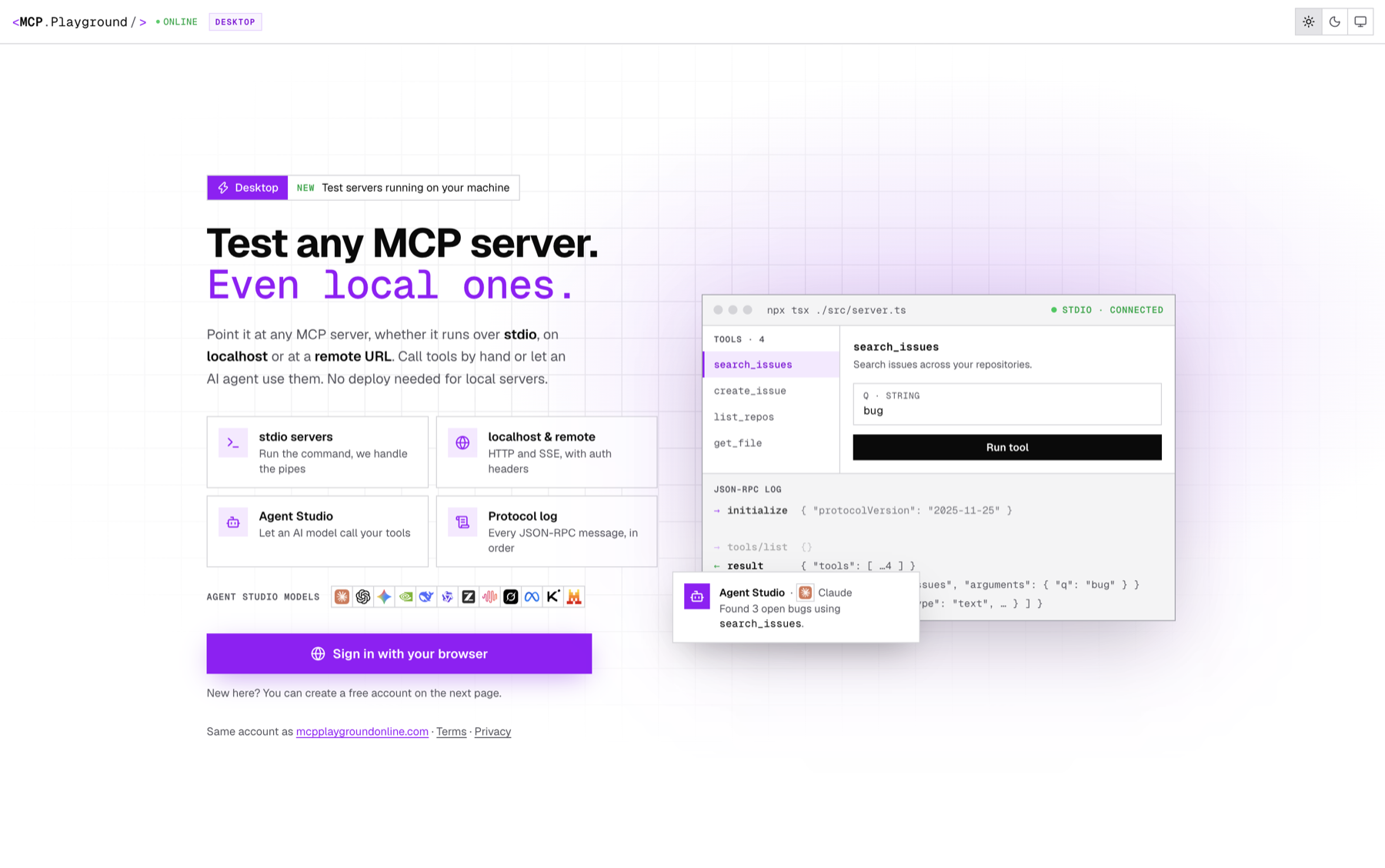
What it does that the other two don't:
- Import from five clients at once. It reads the config files for Claude Desktop, Cursor, VS Code, Windsurf and Claude Code. Each server comes in with its command, arguments, working folder and env vars.
- A Server stderr tab. Stack traces and "missing API key" messages land there. When a connect fails and the server printed something, the error points you to it.
- Spawn errors you can act on.
spawn uvx ENOENTbecomes "Couldn't find uvx on this computer" plus the install command for your OS. - A run prompt for every new stdio command. You see the exact command, folder and env var names before anything runs, and again whenever they change.
- History, encrypted on your machine. Your last 500 calls, with input, result and timing, stored with your OS keychain and never uploaded.
Where it falls short, honestly: no OAuth sign-in flow (use a bearer token or headers), no MCP Apps, no CLI for CI yet, and it's paid after a 7-day trial. The MCP Playground Desktop guide walks through every tab.
Which MCP Inspector alternative handles a broken local server best?
Here's the case that started this post. Your server works with node build/index.js in a terminal, and Claude Desktop says "Server disconnected".
The Inspector usually can't reproduce this. You start it from the same terminal, so the server inherits the same PATH and folder that make it work.
Postman gets closer. It's an app, so it doesn't share your shell's setup. But you paste each config by hand, and there's no separate view for what the server printed.
MCP Playground Desktop is built for it. Import your Claude Desktop config, and the server gets the same command, args and env that Claude uses. It only passes basic system variables plus the server's own env, like an SDK client does.
On a Mac it loads your login shell's PATH. So if the server connects in the app but not in Claude Desktop, PATH is your problem. If it fails in both, the stderr tab usually says why.
For the causes themselves, see MCP server works in terminal but not in Claude Desktop and Fix "spawn npx ENOENT".
Download MCP Playground Desktop for Mac or Windows →
Testing MCP tools with AI models
A tool that works when you call it can still fail when a model calls it. A vague description or a loose schema only shows up when a model has to choose.
- MCP Inspector: no model. You are the client.
- Postman: AI requests let you pair a model with an MCP server and compare responses.
- MCP Playground Desktop: Agent Studio lets you pick from 80+ models (Claude, GPT, Gemini, Llama, Qwen, DeepSeek and more) and chat with your local servers attached.
Agent Studio asks before running risky tools. By default it stops on any tool marked destructiveHint: true, using the tool annotations from the spec. You can make it ask before every write, or never.
My tip: run the same prompt on two or three models. If one picks the wrong tool, the description is usually the problem, not the model.
Which MCP testing tool should you pick?
- Pick MCP Inspector if you want free and open source, need to debug OAuth, build MCP Apps, or want a test step in CI today.
- Pick Postman if your team already shares API collections there and wants MCP requests in the same workspace.
- Pick MCP Playground Desktop if you're fighting a local stdio server, want your client configs imported in one click, or want models calling your local tools.
- Pick nothing if your server is on a public HTTPS URL. The browser tester works with no install and no account.
These tools aren't exclusive. I use the Inspector's CLI in CI and the desktop app while I'm building. For a full testing checklist, see how to test local MCP servers.
Whatever you pick, remember that a stdio server runs with your full user permissions. Read a config before you run it. Here's why.
Frequently Asked Questions
What is the best MCP Inspector alternative?+
Can Postman test MCP servers?+
What changed in MCP Inspector v2?+
Why does my server work in MCP Inspector but not in Claude Desktop?+
Is there a desktop app version of MCP Inspector?+
Which MCP testing tool works in CI?+
Conclusion
The MCP Inspector is still the reference, and v2 made it better for OAuth, MCP Apps and CI. Postman makes sense when your team already shares collections there.
If your problem is a local server that works in one place and not another, test it outside your terminal with the client's real config. Get MCP Playground Desktop for Mac and Windows →
Written by Nikhil Tiwari
15+ years in product development. AI enthusiast building developer tools that make complex technologies accessible to everyone.
Free MCP Tools (no install)
Build, compare & ship MCP agents
Connect any MCP server, run evals on it, compare 80+ models side-by-side, deploy hosted servers, and save reusable agents you can export as an API — all in your browser.